Applying is always free for workers · 7-day free trial · No subscription · No auto-renewal
FAQ
Getting Started
Linkr is an AI hiring assistant for small businesses.
You set up an AI assistant, share a hiring link, and the AI chats with every applicant. It can:
Ask the right questions
Collect applicant details
Help screen candidates based on your requirements
You can review applicants at your own pace, without being interrupted all day.
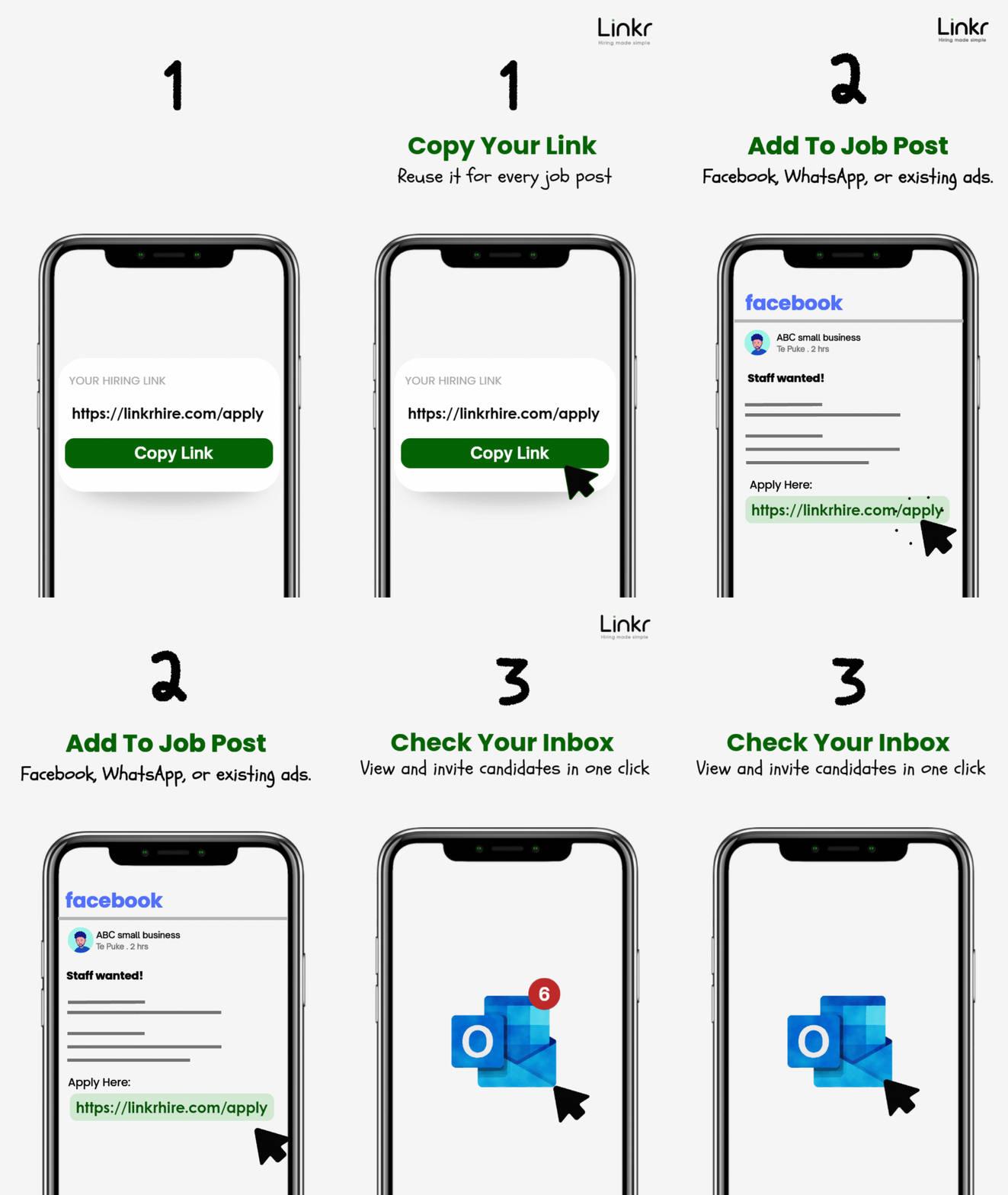
1. Set up your AI assistant Choose a character and add your job details, such as pay, hours, and requirements.
2. Share your hiring link anywhere Post it on Facebook, WhatsApp groups, community boards — wherever you find candidates.
3. Applicants chat with your AI They open the link and answer questions. The AI collects their details and screens them based on your requirements.
4. Review and manage applicants anytime Log in whenever you want to review candidates, or check your summary emails at 8am and 5pm. You can also invite or contact applicants directly from your dashboard.
Most employers are up and running in under 5 minutes.
You simply:
Choose an AI character
Answer a few quick questions about the role (pay, hours, requirements)
Then your hiring link is ready to share immediately.
Not at all. Linkr is designed for non-technical users. Just choose an AI character, answer a few quick questions about the job, and your hiring link is ready in minutes.
Linkr is designed for small businesses that hire hourly, casual, seasonal, or entry-level workers. This includes farms, orchards, hospitality venues, cleaning companies, construction businesses, retailers, and many others.
It's especially useful for employers who recruit through Facebook, WhatsApp groups, and community boards.
Yes. Every AI assistant is customized to your role. You choose its name and provide the information you want it to use, such as pay rates, hours, visa requirements, physical demands, and other hiring criteria.
The AI then uses those details to answer questions, collect applicant information, and help screen candidates based on your requirements.
Applications
Applications appear instantly in your AI hiring assistant. Log in anytime to view applicant details, review responses, and manage your hiring process.
You'll also receive up to two summary emails per day whenever there are new applications, so you can stay updated without needing to check throughout the day.
You decide what your AI assistant asks during setup.
Common topics include:
Visa and work rights
Availability and start date
Relevant work experience
English proficiency
Schedule flexibility
You can also add your own role-specific requirements.
If an applicant doesn't meet your requirements, the AI flags them for review — but still allows them to apply if they choose to.
Yes. Your AI assistant is available 24 hours a day, 7 days a week. Applicants can start a conversation and submit their details at any time — you don't need to be online or available.
Yes. The AI can answer common questions about the role based on the information you provide during setup, including:
Pay and hours
Location and transport
Shift schedules
Job requirements
If an applicant asks something that's not covered, the AI will let them know and suggest they contact you directly.
The AI automatically responds in the language the applicant uses. If an applicant writes in Mandarin, Spanish, Hindi, or any other language, the AI will reply in the same language — no setup required.
No. Linkr is designed around conversational screening rather than resume collection.
For many hourly, seasonal, and entry-level roles, employers care more about availability, work rights, experience, and job requirements than a traditional resume. The AI collects this information directly through the conversation, making applications faster and easier for both employers and applicants.
The AI will gently let the applicant know they may not meet the requirements — for example, if they don't have the right visa or can't work the required hours. However, the AI never rejects anyone outright. The applicant can still choose to submit their details, and you decide whether to proceed.
The AI responds using the job details and requirements you provide during setup. It doesn't create its own policies, promises, or job conditions.
You're always in control. You can review conversations at any time and update your job details whenever things change, ensuring the AI stays aligned with your hiring requirements.
No. Workers simply open your hiring link and start chatting with your AI assistant. No login, no account, no app to download.
No. Your hiring link can receive unlimited applicants while your plan is active.
Once an applicant completes their conversation with the AI, you'll see them in your hiring assistant right away.
From there, you can review their details, check whether they meet your requirements, invite them for an interview, send them a WhatsApp message, or mark them as not suitable — all in one place.
AI & Automation
During setup, you'll complete a short training process where you provide details about the role, such as pay, hours, location, requirements, and any other information applicants should know.
The AI uses these details to answer questions, collect applicant information, and help screen candidates based on your requirements.
Yes. You can change your job details at any time from your hiring dashboard.
Once updated, the AI will immediately use the new information when talking to future applicants.
The AI handles the early stages of hiring for you. It can:
Answer questions about the role
Collect applicant details through chat
Screen candidates based on your requirements
Flag applicants who may not be a good fit
Notify you when new applications arrive
So instead of replying to every applicant, you only focus on reviewing and choosing the right candidates.
The AI doesn't make final hiring decisions — that's always up to you.
It also can't make phone calls, send WhatsApp messages, or access information outside of what you've provided during setup.
You handle all final actions like inviting or contacting applicants inside your hiring assistant.
No. The AI only flags applicants who may not meet your requirements — it doesn't reject anyone.
Every applicant who completes the conversation is saved in your account, so you can review everyone and make the final decision.
Yes. This is one of Linkr's core features.
The AI compares each applicant against your requirements during the conversation and helps you identify the most suitable candidates.
You can filter your applicant list to quickly focus on the strongest matches.
Hiring Management
Yes — but one at a time per hiring link.
You can update your AI assistant whenever you're hiring for a new role. The same link will then automatically reflect your latest job details and screen new applicants accordingly.
Your previous setups are saved, and all applicants remain stored in your account, so nothing is lost when you switch roles.
Yes. You can turn hiring on or off anytime from your hiring assistant. When paused, applicants who open your link will see that you are not currently accepting applications.
Yes. Your hiring assistant keeps all applicants organised in one place, showing their key details and current stage in the hiring process.
You can filter by status — new, invited, confirmed, or not suitable — so you can quickly focus on the candidates you want to move forward with.
Yes. When applicants share their WhatsApp number, it appears in your hiring assistant.
From there, you can open WhatsApp directly or send interview invitations with a single tap.
Yes. You can send interview/trial shift invitations directly from your hiring assistant, including date, time, and location.
Applicants receive the invitation via WhatsApp and can respond instantly. Their responses are tracked in your hiring assistant, so you always know who has confirmed.
Yes. You can turn hiring back on anytime from your hiring assistant.
Your hiring link, AI setup, and existing applicants are all preserved, so you can continue where you left off without starting again.
Pricing
30 Days — $49 NZD Great for occasional or seasonal hiring.
365 Days — $389 NZD Best value for businesses hiring regularly throughout the year.
One-time payment only. No subscription. No auto-renewal. Your plan simply expires at the end of the period.
Yes. Every new account includes a 7-day free trial — no credit card required. You can set up your AI assistant and start receiving applicants right away. At the end of the trial, choose a plan to continue.
No. There are no setup fees, hidden charges, or onboarding costs. You pay only for the plan you choose, and your first 7 days are always free.
No. Linkr is a one-time payment with no contract, no subscription, and no lock-in. Your plan is active for the period you purchase and expires automatically — no cancellation needed.
Because Linkr is not a subscription, there is nothing to cancel. Your plan simply expires at the end of the period. If you don't want to continue, you just don't renew — no action required.
Purchases are generally non-refundable once completed. If you experience technical issues preventing you from using the service, please contact us and we'll do our best to help.
Security & Privacy
Yes. Applicant data is securely stored and protected at all times.
Only you have access to your hiring assistant, including all conversations and applicant details. We use standard security measures to protect your data in transit and when stored.
You do. All applicant data collected through your hiring link belongs to you.
Only you can access it through your hiring assistant. We do not sell, share, or use your data outside of providing the Linkr service.
Not currently. You can view and manage all applicant information directly in your hiring assistant.
Applicant data is securely stored while your account is active and needed to provide the service.
You can delete your data at any time.
If you return after a period of inactivity, your previous data is usually still available so you can continue where you left off.
Yes. Linkr is designed to comply with applicable privacy and data protection regulations.
We only collect the information needed to provide the service, and applicant data is shared only with the employer who created the hiring link.
Support
Setup is quick and guided step by step — most employers finish in under 5 minutes.
If you need help, you can access support directly from your hiring assistant at any time.
Yes. We provide support for all Linkr users.
You can contact us at support@linkrhire.com if you need help using the product or managing your account.
We aim to respond to all support emails within one business day. For urgent issues affecting your active hiring, please mention this in your email and we will prioritise your request.
Welcome to Linkr. By using Linkr services, you agree to these Terms & Conditions.
1. Description of Service
Linkr is an AI-powered hiring tool for small businesses. It provides employers with an AI assistant that chats with job applicants, collects their details, and screens them automatically. Linkr acts only as a software tool and does not act as an employer, recruiter, or employment agency.
2. Using the Service
By using Linkr, you confirm that the information you provide is accurate, you are authorised to recruit for the business you represent, and you are at least 18 years old.
3. Job Posting Responsibility
Users are fully responsible for the content of their job advertisements and the information they provide to train the AI assistant. You agree not to submit fraudulent, misleading, discriminatory, or illegal job offers.
4. AI Assistant
Linkr uses AI (powered by Anthropic Claude) to conduct conversations with applicants on your behalf. The AI follows the instructions and job details you provide. You are responsible for ensuring your instructions comply with applicable employment laws. Linkr does not guarantee that AI responses will be error-free in every situation.
5. Payments & Plans
Linkr offers a 7-day free trial (no credit card required), a 30-day plan ($49 NZD), and a 365-day plan ($389 NZD). Payments are processed securely via Stripe. Plans are one-time payments — there is no subscription and no auto-renewal.
6. Refund Policy
Purchases are generally non-refundable once completed. If you experience technical issues, please contact us and we will do our best to resolve the issue.
7. Applicant Data
Employers agree to use applicant information only for recruitment purposes and to comply with applicable privacy laws, including the New Zealand Privacy Act 2020.
8. Limitation of Liability
Linkr provides the service "as is". To the maximum extent permitted by law, Linkr is not responsible for hiring decisions, AI conversation outcomes, disputes between employers and applicants, or any loss of business or data.
9. Governing Law
These Terms are governed by the laws of New Zealand.
Linkr respects your privacy and is committed to protecting personal information collected through our services.
1. Information We Collect
We collect employer information (name, business name, email, phone) provided during registration. We also collect job applicant information submitted through AI conversations, including name, phone number, visa type, availability, work experience, and any other details shared during the chat.
2. AI Conversations
Applicant conversations with the AI assistant are processed by Anthropic (the provider of the Claude AI model) in order to generate responses. Conversation content is used only to conduct the hiring conversation and deliver results to the employer. We do not use conversation data to train AI models.
3. How We Use Information
We use collected information to provide the AI hiring tool, deliver applicant details to employers, send summary emails, and communicate with users about the service.
4. Sharing of Information
Linkr does not sell or rent personal information. Applicant information is shared only with the employer who created the job posting. Payment processing is handled securely by Stripe.
5. Data Storage
Data is stored securely using Cloudflare infrastructure in accordance with industry standards. We take reasonable steps to protect all stored information.
6. Retention
Employer and applicant data is retained while your account is active. You may request deletion of your data at any time by contacting us.
7. Your Rights
Under the New Zealand Privacy Act 2020, you have the right to access, correct, or request deletion of your personal information.
Linkr provides tools that allow employers to create and share job advertisements. Linkr does not verify every job posting and does not guarantee the accuracy or legitimacy of job advertisements.
Linkr is not responsible for the accuracy of job descriptions, the legitimacy of employers, hiring decisions, or any disputes between employers and applicants.
Job seekers should exercise their own judgment when applying for any job. If you believe a job posting is fraudulent or inappropriate, please contact us.